
A Quick Introduction to Vectorization in Matlab
Overview
Vectorization is the use of Matlab's implementation of matrix algebra syntax or
array operators
to perform calculation without the explicit use of loops.
| Vectorized expression : x = linspace(0,2*pi); y = sin(x); Because x is a vector, Matlab auto- matically creates y as a vector of the same shape. Each element of y is the sine of the corresponding element of x |
Equivalent Loop : n = 100; dx = 2*pi/(n-1); x(1) = 0; y(1) = sin(x(1)); for i=2:n x(i) = x(i-1) + dx; y(i) = sin(x(i)); end |
Advantages
Vectorization is good because
•
Vectorization enables writing of code that is compact and idiomatic.
•
Compact, idiomatic code is easier to read and debug.
•
Vectorized code is faster, even though the same computations are performed.
Matrix Operations are Vectorized
The Matlab *, +, and - operators adhere (mostly) to the rules of linear algebra.
Examples:
>> x = [1; 2; 3]; y = [5; 1; -2];
>> z = x + y
z =
6
3
1
>> A = [2 -1 3; 4 0 7; 5 9 -6];
>> u = A*x
u =
9
25
5
Scalar addition
You cannot add a scalar to a vector or a matrix, but Matlab allows the following
abuse of the
notation of linear algebra .
>> s = 2
s =
2
>> B = A + s
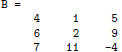
>> v = z + s
v =
8
5
3
Array Operators
There are situations where vectorization would be good, but not supported by the
rules of linear
algebra.
Example: Compute the area of a set of circles , a =πr2, where r is a vector of
radii. According
to the rules of linear algebra , only square matrices can be squared.
To help the programmer, without breaking the rules of linear algebra , Matlab
provides array
operators. In the case of the square (or any power ), the expression y =x.^2
creates a vector y of the
same shape as x, and each element of y is the square of corresponding element of
x
| Vectorized expression: a = pi*r.^2; |
Equivalent Loop : for i=1:length(r) a(i) = pi*x(i)^2; end |
| Operator | Meaning | Vectorized Example |
Equivalent Loop |
| .* | Element-by-element multiplication |
z = x.*y | for i=1:length(x) z(i) = x(i)*y(i); end |
| ./ | Element-by-element division |
z = x./y | for i=1:length(x) z(i) = x(i)/y(i); end |
| .^ | Raise each element to a power |
z = x.^(1/3) | for i=1:length(x) z(i) = x(i)^(1/3); end |
Note: There is no need for .+, .- operators.
| Prev | Next |